
Drupal 7 End-of-Life:
What Marketing Directors Need to Know

What “End-of-Life” Really Means

“End-of-Life” (EOL) is developer-speak for no more updates, patches, or security fixes. Once Drupal 7 is fully deprecated, your site won’t just be “outdated” — it will be vulnerable.

Without ongoing updates: – Modules will stop being compatible

  • Plugins will break
  • Hosting providers may stop supporting your stack
  • And yes, security risks will increase — quickly

If your website handles leads, logins, or any form submissions, this is not a risk worth taking.

Why It Matters for Marketing Directors

You might not write code, but Drupal 7’s EOL lands squarely in your world. Here’s why:

Without ongoing updates: – Modules will stop being compatible

  • SEO and site health: Broken plugins or redirects can tank your rankings overnight.
  • Campaign agility: Without a stable CMS, launching new landing pages or updating content becomes an IT bottleneck.
  • Compliance: Outdated platforms can open you to data security and accessibility issues.
  • Budgets: Emergency rebuilds always cost more than planned migrations.


In other words — this isn’t an IT issue. It’s a brand, marketing, and revenue issue.

Your Options (and What to Avoid)

You technically have three choices right now:

When you move from Drupal to WordPress, you gain:

  1. Stay on Drupal 7 (not recommended) 
    Short-term “extended support” is available from some vendors — but it’s expensive, limited, and temporary. Think of it as duct tape on a sinking ship.

  2. Upgrade to Drupal 10
    This path works for organizations deeply invested in Drupal’s ecosystem, but it’s complex, developer-heavy, and rarely marketing-friendly.

  3. Migrate to WordPress
    WordPress powers more than 43% of the web for a reason. It’s flexible, secure, and designed for marketing teams — not just developers.

Why So Many Teams Are Moving to WordPress

A migration isn’t just about avoiding risk — it’s about setting your marketing team up for growth.

When you move from Drupal to WordPress, you gain:

  • Ease of use: Make content updates in minutes, not tickets
  • SEO-ready architecture: Built-in tools and plugins to preserve and improve rankings.
  • Lower maintenance costs: Fewer developer hours and faster updates.
  • Scalability: Thousands of integrations that grow with your business.


It’s not just a CMS swap — it’s a workflow upgrade.
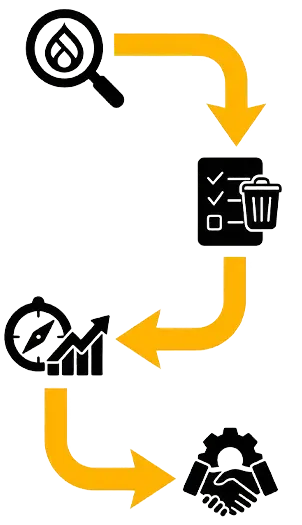
How to Prepare for a Migration

If you’re starting to plan your move:

  1. Audit your current Drupal site.
    List all pages, integrations, and critical features.


  2. Decide what’s worth keeping.
    Some functionality may need re-thinking — we’ll help you spot what’s outdated.


  3. Plan redirects and SEO preservation.
    This is crucial to avoid ranking loss.


  4. Choose the right partner.
    Not all migrations are equal — look for an agency that understands both marketing goals and the technical side.

The Bottom Line

Drupal 7’s end-of-life isn’t just a deadline — it’s an opportunity. If your site’s been holding your team back, this is the perfect time to modernize.

See how we migrate Drupal sites safely to WordPress.

You didn’t scroll this far just to settle. Let’s make something sharp, gutsy, and built to stand out — the kind of work that doesn’t play it safe.

SHARE POST